
Social Network: Alert me!
The same alert app is feedalizr (i used this one... why? no specific reason)
Posted by
Unknown
11:58 AM
0
comments
Bagaimana Sync Calendar: Mobile + Google Calendar + Outlook(Office Calendar) + iCal(macam saya)
Howto Sync Calendar: Mobile + Google Calendar + Outlook(Office Calendar) + iCal(like me)
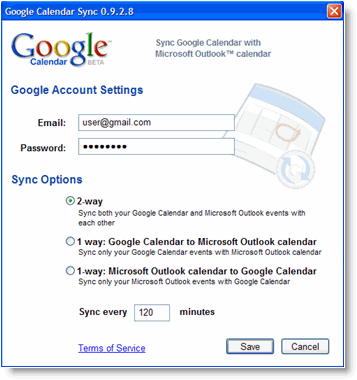
Semasa di pejabat (At office hour), saya menggunakan Ms Outlook dan saya pasti ramai menggunakannya, untuk kegunaan kerja2 harian yang tak habis di pejabat. Yang pasti saya nak Outlook Calendar sync dengan Google Calendar; tujuan= supaya saya boleh lihat calendar di luar waktu pejabat. Saya gunakan Google Calendar Sync(Windows);

Dapatkannya di sini.
Apabila balik dari kerja (after office hour), jumpa kawan2 di kedai kopi; 5 temujanji di buat (yup, lima... banyaknya. Popularnya aku!!). Dengan guna phone Nokia S60> Calendar, aku catat temujanji. Secara tak langsung, calendar phone aku telah sync dengan Google Calendar. Nasib baik aku ada Goosync, auto update Calendar mobile <-> Google Calendar. Macamana aku buat;


Settings>Sync (manual Sync)
Set the Include in sync option to Yes (set other apps No)
Provide a Remote database name of Calendar
Leave the Synchronisation type set to Normal
Server version: 1.2
Server ID: blank
Data bearer: Internet
Access point: Access Point (Celcom3G/Digi3G)
Host address: https://sync.goosync.com/
Port: Leave this set to 80 for standard connection or 443 for SSL connections
User name: Set this to your GooSync username
Password: Set this to your GooSync password
Allow sync requests: Yes
Accept all sync reqs.: No
Network authentic.: No
Kalau nak auto Sync, jangan lupa install Swim sekali. Swim autoupdate Sync 15m, 30m > 12jam.

Pst: Ada juga yg pakai nuevasync, plaxo, CalSyncS60 & dll
Pst: Untuk pengguna phone WindowMobile, anda bole pakai Oggsync & dll
Sampai di rumah (at home), aku buka MacPro aku untuk melayari internet dan chit-chat dengan kawan2 di perantauan (selalunya buang masa di Youtube.com.. hehehe). Mak aku call suruh balik kampung, ada 5 kenduri kawin hujung minggu ni(huh, sabtu & ahad, ada 5 kenduri... :-( ). Buka iCal, terus update calendar. Macammana?? iCal > Preference > Accounts > +. Masukkan Gmail username& password, di Acc. Url = https://www.google.com/calendar/dav/yourusername@gmail.com/user


So, selesai kitaran Calendar aku; kerja +lepas kerja +di rumah. Jika anda perasan, Google Calendar adalah Master Calendar dan jika anda suka buka browser, anda hanya perlu layari http://www.google.com/calendar.
Sekian.
Posted by
Unknown
2:39 PM
0
comments
Labels: mobileical
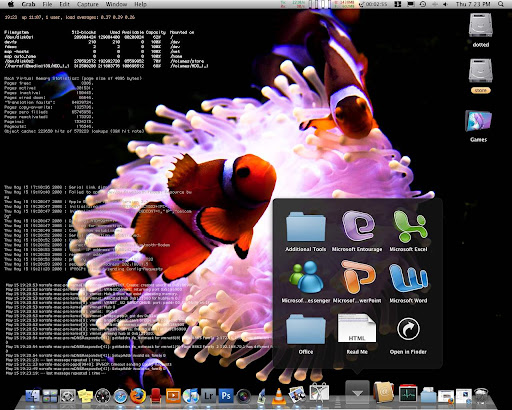
MSI Wind U100 hack using OSX

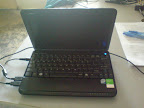
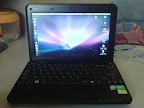
I've been busy lately with working, but I've try to squeeze my time to hack my lovely MSI Wind to run OSX. And its run awesome, and I called little 'windtosh' as mini Macbook Air. Here some screenshot of my mini Macbook Air;

But this MSI Wind not 100% fully compatible with OSX, Wifi + Earphone &MiC are not working. But I manage to get mini pci-e wifi card (dell 1394) & wifi working perfect. For those wanna hack their MSI Wind, you can find good guidance from below link.
http://www.msiwind.net/
http://wind-osx86.wikispaces.com/
http://windosx.wikispaces.com/
Now, you can get MSI Wind $349 at Best Buy. That's include WinXP. Introduction video of Mini Macbook Air;
Posted by
Unknown
12:07 PM
0
comments
How to Hack S60 Phone
- Install freeware X-plore, a file manager from Lonely Cat Games. Run X-Plore, press 0 and check first 4 boxes. Don’t exit.
- Install and run HelloCarbide by FCA00000.
- Switch to X-plore and check if you can see the contents of C:/sys/.
If you can, then you are halfway done. If not, try step 2 again. - Download CapsOnOff.rar by FCA00000.
- Copy CProfDriver_SISX.ldd from RAR downloaded above into C:\sys\bin of your phone. You can do this with X-Plore.
- Install CapsOn.sisx and CapsOff.sisx. Run CapsOff application to turn on the hack.
- Download SIS installer mod for Symbian 9.2 and copy installserver.exe file to c:\sys\bin\ so you can install unsigned applications
- Install ROMPatcher by Zorn.
- Whenever you need to install an unsigned application or patch your
phone, just run the CapsOff application first. CapsOn brings it back to
normal state.
Posted by
Unknown
10:32 AM
0
comments
'how do i photograph...'???

Get your tips there; I love to read those information come with pic & video. My favorite is '11 tips for better Candid Photography', because I like taking pic without flash. For expert view, I always get Joe McNally blog:

For editing, I'm using Adobe Lightroom and my favorite blog is 'lightroom killer tips' with 'Matt Kloskowski'.

Posted by
Unknown
11:11 AM
0
comments
www.igetconnection.com

I just release my new biz page, please feel free to stopping-by. Why I create this business? I believe many people out there need this kind of service, but normally we hear;
"Expensive la! No budget la..."
"No need la, my phone enough already..."
"Don't know where to start"
"That's only for IT business..."
"Expertise tarak..."
It's simple solution to put your company name in WWW space (also with your name, put it in your name card). Let us do for you. It's a vital step to your company growth. I'm not promise you that, but I promise you that your future customer only ain't from your neighbor but maybe from other country...
Cheers.
Posted by
Unknown
9:54 PM
0
comments
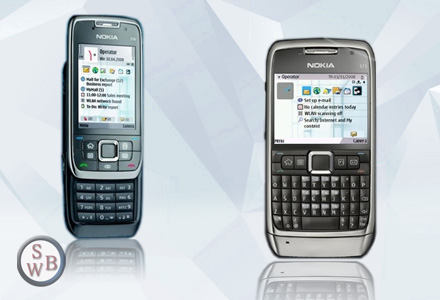
E66 & E71 official press pic

SWB reported the upcoming business devices from Nokia. So, save your pocket now, this is worth gadget to invest.
Posted by
Unknown
12:06 PM
0
comments
Big Boys Toy: HTC Touch Diamond

HTC Touch Diamond Highlights
- 2.8-inch touch screen, with four times the pixels of most phones
- Vibrant TouchFLO 3D user interface, responding perfectly to your
finger gestures when scrolling through contacts, browsing the web, and
launching media… all vividly displayed as photos and artwork powered by
the 3D graphics processor - HTC Weather - providing a constant view of weather at home and abroad.
- Surf and download at broadband speed with HSDPA internet connectivity
- 3.2 megapixel auto-focus camera for quality stills and video
- 4GB of internal storage to preserve more photos, music, files and exchanged data than ever before
- Integrated GPS for use with maps software for a full turn-by-turn satellite navigation experience
Do we still waiting an iPhone here, in Malaysia?????
Posted by
Unknown
3:23 PM
0
comments
Labels: mobile
Project Asus_Mac_Pro: hardware
I'm in the middle of Project:Asus_Mac_Pro. Here my hardware lists:
- Asus P5WDH Deluxe
- Intel Celeron D 2.6GHz
- Gecube Nvidia 7300GT
- 2Gb RAM
- iCute power@450W & casing
- 250Gb 5400rpm Seagate HDD
- Imation DVD Writer
- Asus P5WDH Deluxe
- Intel Quad-Core Q6600 (new)
- Gecube Nvidia 7300GT
- 2Gb 800MHz Kingston (new)
- iCute power@450W & casing
- 250Gb 5400rpm Seagate HDD
- Imation DVD Writer


Blogged with Flock
Posted by
Unknown
7:16 PM
1 comments
Howto: Blogger using email@ Nokia e90
To owner Nokia e90, there is no Lifeblog for you. So you cannot mobile blog seamless as before (if you using Lifeblog before, like me). Now, I finally found the easiest way, email your blog. Create your email address at Setting> Email> Mail-to-Blogger address. Use this email address to send your blog to Blogger.
More info here.
Blogged with Flock
Posted by
Unknown
12:53 PM
2
comments
Labels: e90
Get Adobe Air: Enrich your desktop
![]()
Hmmmm, adobe just release 1.0 Adobe Air. Try it out, its enrich your desktop. I already try to both OSes, Mac & Win. Select application which suit you. Here my examples;

Blogged with Flock
Posted by
Unknown
12:38 PM
0
comments
E71: Coming soon

Coming soon! New sexy E71 57mm x 10mm will include HSDPA, Wifi, microSDHC support, 3.2 megapixel camera & also gps. Start saving, and this is worth investment for your pocket.
Get more info here.
Posted by
Unknown
12:51 PM
0
comments
Picture by e90 + location tagger + email2blogger
Tag=e90
Posted by
Unknown
1:48 PM
0
comments
Blogging on e90

Disappointed! There is no blogging application for E90. But i'm using Blogger which is support email2blogger. What a waste Nokia created a bigger screen & QWERTY keyboard phone, but this advantages cannot be used by blogger. Looking forward Tommi & friends at Nokia Betalabs can help me(us).
Posted by
Unknown
1:08 PM
0
comments
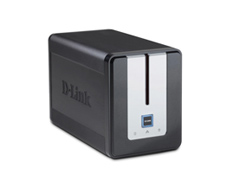
ASUS Eee PC + DLINK DNS 323; Gabungan terbaik saya


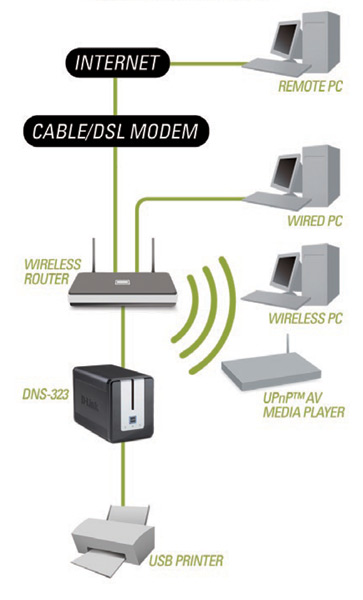
ASUS eee pc RM1499 (4G + camera) dengan Dlink DNS 323 RM499 (bekas sahaja) adalah gabungan yang sangat baik. ASUS eee pc adalah pilihan baik untuk pengguna yang inginkan multimedia, melayar internet dan belajar, tanpa membawa laptop yang berat. Kelemahan Asus eee pc adalah ia tidak mempunyai storage yang besar, kepada pengguna yang bergerak; gabungan terbaiknya ialah mempunyai online storage seperti Gdrive(google) & .Mac (apple). Manakala, kepada pengguna di rumah; gabungan di atas adalah yang terbaik. Lakaran di bawah adalah cadangan produk2 Dlink.
Arstecnica telah mengeluarkan review yang saya anggap terbaik, juga anda boleh capai di czone & eee pc user
Sekali lagi linux berjaya menambat hati ramai. Secara peribadi, saya ingin memiliki 1 untuk anak-anak saya belajar & mengenali komputer. Hoorey...
Blogged with Flock
Posted by
Unknown
4:00 PM
0
comments
IM in Maxis & Digi
Maxis, DiGi lancar IM mudah alihUtusan Malaysia Online - Korporat
KUALA LUMPUR 13 Nov. – Maxis Communications Sdn. Bhd. (Maxis) dan DiGi Telecommunications Bhd. (DiGi) menjadi pengendali talian mudah alih pertama di rantau Asia melancarkan khidmat pesanan segera (IM) mudah alih.IM mudah alih yang ‘meniru’ konsep perbualan menggunakan teks menerusi internet seperti Yahoo Messenger dan MSN Messenger itu ditawarkan kepada pelanggan kedua-dua talian tersebut pada harga RM2 sehari bagi DiGi dan RM1 bagi 100 IM yang dihantar untuk Maxis.

Tak perlu ni!!! Hanya gunakan Fring.
Blogged with Flock
Posted by
Unknown
4:38 PM
1 comments
Labels: mobile
Android OS


Android adalah OS untuk mobile yang baru sahaja dilancarkan oleh Google. Ia akan menyertai Windows Mobile, Symbian & Palm dalam dunia mobile. Android menggunakan Linux kernel sebagai Core/ tulang belakang OS ini. Capai maklumat ini di:
http://www.openhandsetalliance.com
http://android-developers.blogspot.com/
http://youtube.com/user/androiddevelopers
Satu lagi kejayaan Linux, dan kita tunggu hasilnya awal tahun 2008.
Blogged with Flock
Posted by
Unknown
10:50 PM
0
comments
Labels: mobile
Blogger & Flickr using FLOCK
aku sebenarnya pengguna setia Performancing@Scribe-fire untuk blog ke blogger.com, tapi kebelakangan ni bila di Linux invironment, benda ni tak berfungsi baik. Juga aku pengguna setia hello untuk upload ke flickr, google@picasa@hello telah mematikan peranan BOT untuk upload ke flickr.
Aku tesion!
Searchx2... googlingx2... akhirnya jumpa aku dgn FLOCK : mozilla web based, (www.flock.com). Secara peribadinya, aku memang suka giler dgn FLOCK. Contohnya; aku print-screen windows terus gam kat blog editor, automatik flock upload ke flickr. MUDAH giler.
Blogged with Flock
Posted by
Unknown
12:48 PM
0
comments
Labels: internet