Orange Blog finds GSM remote control

Nice application added for GSM.


Sent to you by norrafi via Google Reader:


gsm auto UK: Orange Blog finds GSM remote control

Orange UKs Blog (called 'The Feed') often finds interesting stuff - and this time is no exception. They report on a GSM remote switch, which simply enough you can call or send a text to - and the switch then does it's business and switches whatever it is connected to ON or OFF!

I checked out the source vendor, Quantek.co.uk, and they had this to say:

The GSM-AUTO is a wireless GSM mobile phone remote control switch that connects to the GSM mobile phone network.

It is activated by calling its mobile telephone number, it will reject the call without answering and switch on or off the device connected to it

It has 2 independent relay switches with normally open and normally closed relay contacts, these can be programmed to switch on for a pre-determined length of time whenever the GSM-AUTO is called, alternatively the switches can be permanently switched on or off by sending the GSM-AUTO a sms text message

Applications include remotely controlling heating, lighting, engine pre-heaters, aviation engine pre-heaters, irrigation systems, water well pumps, pumping stations, remote access control of gates , re-setting of remote servers, control of remote scientific instruments

Personally I love the idea of this - I've got stuff at home that I'd like to boot up or bring off standby on the way home, and the thought of sending a text to do it is just kewl :-)

It's for sale at £139 at the Quantek shop, which ain't the cheapest ever - but then again you can't put a price on leading the mobile convergence revolution, now can you…? ;)

[Via: Orange via: Quantek.co.uk]

Related News from IntoMobile:

Share this: Digg Facebook StumbleUpon


Things you can do from here:


Petition: Nikon D90 owners request MANUAL CONTROL

Photography Blog I read ...

I love reading other people technique & secret on 'how to produce great pic'. Love flexibility on how using the camera, optimize its capabilities. Here some of my favorites;


Reblog this post [with Zemanta]

Bypass throttle for bittorrent


What is Xunlei / Thunder?
Xunlei / Thunder is a feature packed download manager with support for HTTP, FTP, MMS, RTSP, BT, and EMULE. It has multiple resources for Hyper-Threading technology which significantly improve the download speed. Besides, it’s Intelligent Disk Cache technology effectively prolong your Hard Disk’s lifespan from crashing due to the high speed download. Xunlei / Thunder is well known for it’s fake header for HTTP to download torrents via port 80. Therefore, it bypass ISP throttle and maximize the download speed.

The last sentence saying you can cheat ISP, but I dont know whether you can cheat 'Proxy'. Happy trying.

P/s: I cannot try since I'm using Mac. 


my HP Mini 2140 with Moblin, OSX, Win 7

I bought HP mini 2140 3 months ago, its damn good machine. I already try this machine with OSX Leopard (hack version), free Windows 7 & Moblin OS. My personal mark for 3 different OS are;
- OSX Leopard:

- Windows 7: 

- Moblin:

I'll put some reference here;
- Myhpmini.com ; they have good howto, you need to search inside there
- For Moblin, and need extra config on Wlan; find it here.


My personal choice is Moblin, I like very much the Home Screen, like everything can access from there. OSX produce lagging interface, maybe because of GPU and small CPU(just maybe?). Windows 7 also very good, it seem this OS design for this netbook.

Just


Android @ Celcom


keje malam...

Looking best date for 1m free seat airasia.com... mana nak pi ni??

Happy Mother's Day

1 billion apps


2009 Map (that you want to see)


Here how our 2009 transoceanic cable map. To order for your own house/office wall, click map above. To view historical illustrated, find it at boingboing and;


<Above> 2009 Global Internet Map, if you or your company to nerd want to know physical connectivity (other than just ping, route etc) get it here. Also available for your wallpaper.


canvas

rpc_relay

Evening @Kuching with E90

Enable Google Contact Sync Without an iPhone or iPod Touch [Mac OS X Leopard]


Sent to you by Rafi via Google Reader:


via Lifehacker by Gina Trapani on 5/28/08

Mac OS X only: Earlier today we reported that Mac OS's latest update to 10.5.3 included Google contact syncing to Address Book—if you've connected an iPhone or iPod touch to your Mac, that is....


Things you can do from here:


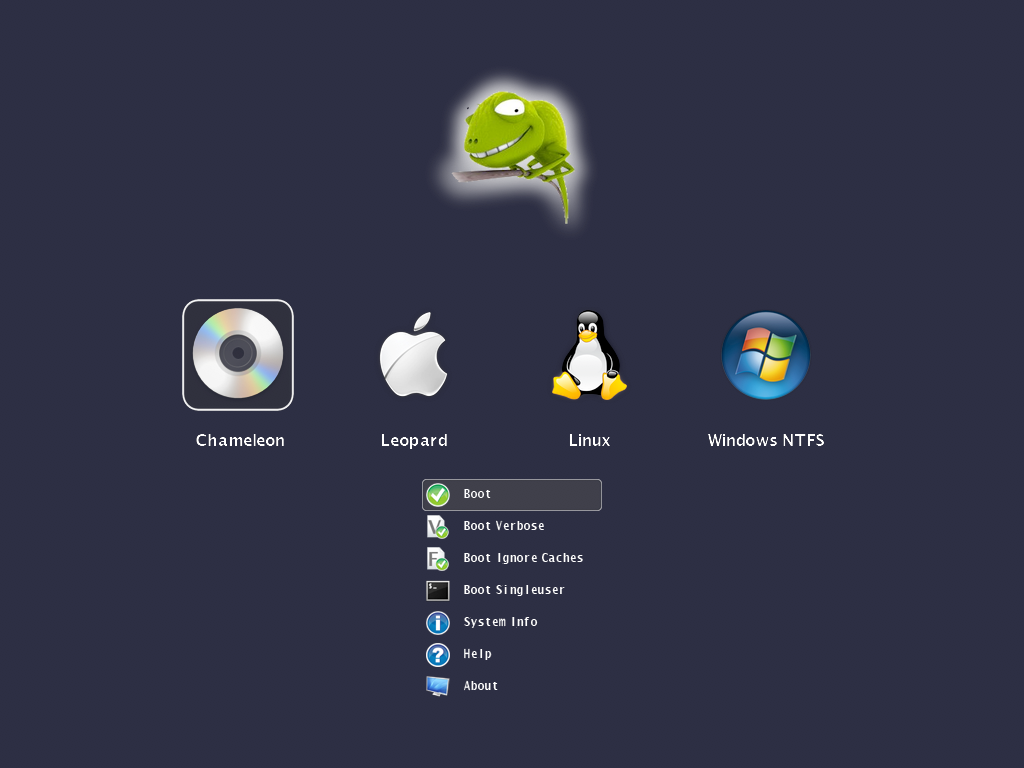
New Chameleon Announced!

Great feature, worth trying...


Sent to you by Rafi via Google Reader:


via InsanelyMac News on 2/4/09

Zef posted this on the Chameleon site today:


QUOTE

How do you mean customizable?You can replace all the images, the icons, the funny chameleon artwork, the fonts. Also you can set the background color, the transparency levels, the dimensons, positions of certain user interface elements. The image resource files can be either embedded into the booter or can be loaded at runtime by using a special .plist style configuration file.  

Doesn't embedding the images makes the boot loader too large?

With the current set of icons, images, fonts embedded, the booter size is about 300k. Without embedding the resources you will get about a 110k large booter. The maximum size of the booter is 392704 bytes (383.5k).

What image formats are supported?

The booter has built-in support for true color 24 bit PNG images with 8 bit transparency layer. We wanted to offer a high quality lossless image format which can be created, edited with many graphics applications across all platforms.

What if I still prefer the text mode interface?

We can't switch between text mode and graphical mode at the moment after the booter has been started, but you still have a Boot.plist option to disable the GUI. This way you get the well known text based Darwin boot menu.

Ok, this is all fine. Can I see something?

Sure! Click below on the pictures in the gallery to see these shots in full size.

Can I have it now?

No. Please don't ask for it as you will get it when it's released.

What's next? Do i have to wait for next christmas ;-)?

We're still fighting with issues and polishing the code but freezed the features. So instead of staying quiet, we're going to reveal other features in the next post on this week.

Image Gallery


Countdown timer using a progress bar.

http://www.insanelymac.com/forum/index.php?act=attach&type=post&id=44517

You can select from many partitions across multiple disks. Even the foreign OS types are detected properly on GPT formatted disks as well.

http://www.insanelymac.com/forum/index.php?act=attach&type=post&id=44518

You can choose from the typical boot options available for native HFS partitions.

http://www.insanelymac.com/forum/index.php?act=attach&type=post&id=44519

This is how the video mode list will be rendered as a transparent window surface over the icons.

http://www.insanelymac.com/forum/index.php?act=attach&type=post&id=44520

Optionally you can replace the grey apple logo with a custom transparent image.

http://www.insanelymac.com/forum/index.php?act=attach&type=post&id=44521


Hi Res images are available on their blog. IT IS NOT OUT YET SO DON'T BOTHER ASKING

24


Things you can do from here:


Howto update to 10.5.6

Update 10.5.6 Combo
(translate from this France tutorial(using Google Translate), thanks to Tekikou). My system was 10.5.3 version, and with this tutorial, everything works perfect.

a) Install Disabler.kext using OSX86Tools.


b) Install Bootloader and DSDT:


First, you need to install an update to your Bootloader PCEfi_V9 here distributed by Trauma23: [Download]
Once downloaded, you open it, then you have something like this:
Double click Chameleon_v1012.pkg and follow the instructions on the screen.

Once installed Chameleon completed, we need to patch the DSDT, therefore double-click on DSDTPatcherGUI_1.0 2 and DSDT Patcher GUI. A window will appear:
Check as in the picture, and put in place Macintosh HD, the name of the hard disk where you installed Mac OS X and then click RUN DSDT Patch.

Before you go to the suite, please Reboot your computer to make sure that the bootloader was installed correctly.


c) Installing the combo update 10.5.6:

Download the update from the server COMBO Apple.

1) You launch the terminal.

Download this script and place it at the root (/) of your drive.

Open the terminal and type:
CODE
sudo-s

Enter your password and then type:
CODE
sh / pmkiller.sh

2) Run then updated and you'll get a window like this:
Once the update is complete, do not restart!.

3) Go into the terminal, open new terminal and type:

CODE
Sudo-s

(we will ask you your password, enter it, do not worry when you type the text is not displayed)

4) Then type:
CODE
sudo nano / System/InstallAtStartup/scripts/1

5) Find the line: /System/Library/Extensions/Dont Steal Mac OS X.kext

6) Replace with: /System/Library/Extensions/dsmos.kext

7) Stay press the Control + O. Then press ENTER.
8) Stay press
Control + X.
9) Type "exit"
10) Close the terminal.


Reboot and cross your fingers biggrin.gif

Syncback: Sync & Backup your files

If you have NAS or backup system in office & at home, best application to sync/backup your precious files, documents, pictures & videos is using Syncback.
It's freeware & for Windows system.


P/S: For D-Link Nas-323 & Mac user (like me); you can follow this guide and if you're using transmission; follow this guide.

Cuti2 Malaysia: Zoo Negara

SAVE PALESTINE! as much as you can...


Powered By Blogger